

1 INTRODUCTION
Restraint in preparation. Simplicity in design. Naturalness in delivery.
An Approach, Not a Method
The six aptitudes are: design, story, symphony, empathy, play, and meaning.
PREPARATION
Creativity, Limitations, and Constraints,
In Sum
• Like a Japanese bento, great slide presentations contain
appropriate content arranged in the most efficient, graceful
manner without superfluous decoration. The presentation of the
content is simple, balanced, and beautiful.
• Presentation Zen is an approach, not an inflexible list of rules to
be followed by all the same way. There are many paths to
designing and delivering presentations.
• The "Death by PowerPoint" approach is common and
"normal" but it is not effective. The problem is not one of
tools or technique so much as it is a problem of bad habits.
Though some tools are better than others, it is possible to
present effectively even with older versions of PowerPoint (or
Keynote, etc.).
• In the "conceptual age" solid presentation skills are more
important now than ever before. Presenting well is a "whole
minded" skill. Good presenters target people's "left brain" and
"right brain."
• Live talks enhanced by multimedia are about storytelling and
have more in common with the art of documentary film than the
reading of a paper document. Live talks today must tell a story
enhanced by imagery and other forms of appropriate
multimedia.
• We've learned some ineffective habits over the years. The first
step to change is letting go of the past.
Planning Analog, 45
"If you have the ideas,
you can do a lot without machinery.
Once you have those ideas,
the machinery starts working for you....
Most ideas you can do pretty darn well
with a stick in the sand."
—Alan Kay
(Interview in Electronic Learning,April 1994
What's my point? And why does it matter?
Handouts Can Set You Free
In Sum
• Slow down your busy mind to see your problem and goals more clearly.
• Find time alone to see the big picture.
• For greater focus, try turning off the computer and going analog.
• Use paper and pens or a whiteboard first to record and sketch out your ideas.
• Key questions: What's your main (core) point? Why does it matter?
• If your audience remembers only one thing, what should it be?
• Preparing a detailed handout keeps you from feeling compelled to cram everything into your visuals
Crafting the Story, 75
simplicity, unexpectedness, concreteness, credibility, emotions, and stories.
Step 1 Brainstorming.
Step 2 Grouping & identifying the core.
Step 3 Storyboarding off the computer
In Sum
• Make your ideas sticky by keeping things simple, using examples and stories, looking for the unexpected, and tapping into people's emotions.
• A presentation is never just about the facts.
• Brainstorm your topic away from the computer, chunk (group) the most important bits. Identify the underlying theme and be true to that theme (core message) throughout the creation of the presentation.
• Make a storyboard of your ideas on paper—and then use software to lay out
• a solid structure that you can see.
• Show restraint at all times and bring everything back to the core message.
DESIGN
Simplicity: Why it Matters, 103
In Sum
• Simplicity is powerful and leads to greater clarity, yet it is neither simple nor easy to achieve.
• Simplicity can be obtained through the careful reduction of the nonessential.
• As you design slides, keep the following concepts in mind: subtlety, grace, and understated elegance.
• Good designs have plenty of empty space. Think "subtract" not "add."
• While simplicity is the goal, it is possible to be "too simple." Your job is to find the balance most appropriate to your situation.
Presentation Design: Principles and Techniques, 119
Signal vs Noise Ratio
Picture Superiority Effect
Ask yourself this: What information are you representing with the written word on a slide that you could replace with a photograph (or other appropriate image or graphic)?
My personal favorite photo site
• iStockphoto (www.istockphoto.com)
Here are some other places to get low-cost images
• Dreams Time (www.dreamstime.com)
• Fotolia (www.fotolia.com)
• Japanese Streets (www.japanesestreets.com)
• Shutter Stock (www.shutterstocl<.com)
• Shutter Map (www.shuttermap.com)
Here are a few sites that offer free images
• Morgue File (www.morguefile.com)
• Flickr Creative Commons Pool (www.flickr.com/creativecommons)
• Image After (www.imageafter.com)
• Stock.xchng (www.sxc.hu)
• Everystockphoto search engine (www.everystockphoto.com)
The Big Four: Contrast, Repetition, Alignment, Proximity
In Sum
• Design matters. But design is not about decoration or about
ornamentation. Design is about making communication as easy and
clear for the viewer as possible.
• Keep the principle of signal-versus-noise in mind to remove all
nonessential elements. Remove visual clutter. Avoid 3-D effects.
• People remember visuals better than bullet points. Always ask yourself how you can use a strong visual—including quantitative displays—to enhance your narrative.
• Empty space is not nothing; it is a powerful something. Learn to see andmanipulate empty space to give your slide designs greater
organization, clarity, and interest.
• Use the principle of contrast to create strong dynamic differences
among elements that are different. If it is different, make it very
different.
• Use the principle of repetition to repeat selected elements throughout your slides. This can help give your slides unity and organization.
• Use the principle of alignment to connect elements visually (through invisible lines) on a slide. Grids are very useful for achieving good alignment. This will give your slide a clean, well-organized look.
• Use the principle of proximity to ensure that related items are grouped together. People will tend to interpret items together or near to each other as belonging to the same group.
Create visuals that are simple with clear design priorities that contain
• elements which guide the viewer's eye.
• Have a visual theme but avoid tired, overused software templates.
• Limit bullet points or avoid them completely.
• Use high quality graphics.
• Build (animate) complex graphics to support your narrative.
• Think "maximum effect with minimum means."
• Learn to see empty space, and learn to use it in a way that brings greater clarity to visuals.
DELIVERY
The Art of Being Completely Present,
Connecting With an Audience,
THE NEXT STEP
The Journey Begins,
笔记
《演说之禅》热门书评
-
禅达
103有用 2无用 Roger 2008-07-22
1.我无论如何也忘不了工作后第一次正式演讲的情形:不知是因为感冒影响了演说,还是因为要演讲,所以莫名其妙就感冒了,那整个下午都是昏昏沉沉的,心里不断回顾着自己的PPT,忐忑不安,即使我的演讲面对内部团队,这个团队只有10个人。2.这次讲演是提前一周就通知了我的,讲的是我那时候研究的一个小领域,我也是...
-
Notes
43有用 1无用 Jack 2009-03-24
0. 作者的网站: www.presentationzen.com1. 成功演示六要素:简单、意外、具体、可信、情感、故事。2. 一切围绕故事展开3. 我们希望从演讲者身上获得的,不是单纯的数据或信息,而是隐含于这些信息和数据背后的深刻含义4. 注意交谈的语气,毫无感情的正式演讲或书面语言很难让人始...
-
做一个好的学术talk的一些注意事项
17有用 0无用 [已注销] 2012-10-09
书中提到的做ppt的一些原则也是导师长期强调的。年初,导师推荐了一个ppt:How to give a talk (http://cel.archives-ouvertes.fr/cel-00529505/en/)。里面的不少注意事项我也深以为然。这里结合书和材料总结一下做一个好的学术talk的一些...
-
筆記:穴道
17有用 0无用 Daneestone 2012-06-26
一、介紹 Power is the ability not just to tell the story of another person, but to make it the definitive story of that person. “所謂權力,不僅是一種講述別人的故事的能力...
-
笨蛋,我们要做的是演讲,不是PPT
15有用 0无用 justfool 2010-01-08
人类从未学会边听边阅读的能力——即便是PPT发明以后。PPT是为了辅助演讲而做的,演讲的目的是为了说服,是“动之以情”的过程,不要用PPT来“晓之以理”。准备讲义,发给听众,把你认为必要的细节放在里面,对听众讲最重要的细节。“我所设计的幻灯片主要是为了现场演说服务,还是要供观众会后阅读呢?”——这是...
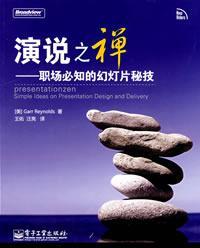
书名: 演说之禅
作者: [美] Garr Reynolds
出版社: 电子工业出版社
副标题: 职场必知的幻灯片秘技
译者: 王佑 | 汪亮
出版年: 2009-01
页数: 248
定价: 59.00元
装帧: 16开
ISBN: 9787121074585